Accessibility
Accessible design
We have tried to use combinations of colours that provide sufficient contrast between foreground and background across the sites.
If you spot anything that gives you problems on this site please let us know.
Making text larger
Internet Explorer
- Go to the View menu using your mouse or by pressing Alt + V.
- Select the Text Size option using your mouse or by pressing X.
- Choose your preferred text size using your mouse or by using the up and down arrow keys and pressing Enter or by clicking on it.
Firefox 3.X
The following instructions will set the minimum font size on your computer's system, so the size will apply to every site you visit.
- Go to Tools in your browser's menu using your mouse or press Alt and T.
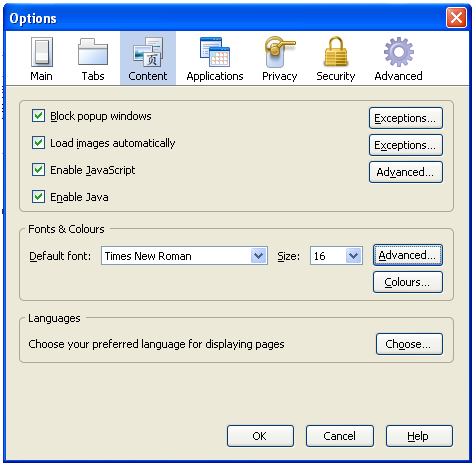
- Click on Options, or press O, to open the Options dialog box.
- Select Content if not already selected or press the tab key until it is highlighted (in blue) and then press Enter.
- Under Fonts & Colours change the font size to the appropriate size and click OK (see example below).
For more information on help with seeing websites including using screen magnifying software, making your mouse pointer easier to see and using your own style sheets amongst other useful tips, go to the BBC My Web My Way website at http://www.bbc.co.uk/accessibility/.
If you have any feedback you would like to share with us about seeing the content of our websites send us an email , we would like to hear from you.
Hearing our Website
Using a screen reader
If you are using a screen reader, we hope you will benefit from our use of meaningful headings, link text and alternative text to navigate our websites. We have also tried to make tables and PDF documents as accessible as possible. If you do come across a PDF document you cannot access, Adobe PDF Reader is free and can be used to open PDF files. A link is provided below:
For more information on help with hearing websites including using screen reading software amongst other assistive technologies, go to the BBC My Web My Way website at http://www.bbc.co.uk/accessibility/
If you have any feedback you would like to share with us about hearing the content of our websites send us an email, we would like to hear from you.
Using your mouse to navigate our websites
For more information on using your mouse to navigate websites such as adjusting the speed of your mouse, making it left-handed and making your mouse pointer larger, go to the BBC My Web My Way website at: http://www.bbc.co.uk/accessibility/. The BBC site also covers alternatives to the mouse and keyboard.
If you have any feedback you would like to share with us about navigating our websites send us an email , we would like to hear from you